Cinnamon (desktop environment)
Cinnamon is a free and open-source desktop environment for Linux and other Unix-like operating systems, which was originally based from GNOME 3 but follows traditional desktop metaphor conventions.
The development of Cinnamon began by the Linux Mint team as the result of the April 2011 release of GNOME 3, in which the conventional desktop metaphor of GNOME 2 was discarded in favor of GNOME Shell. Following several attempts to extend GNOME 3 so that it would suit the Linux Mint design goals through "Mint GNOME Shell Extensions", the Linux Mint team eventually forked several GNOME 3 components to build an independent desktop environment. This separation from GNOME was finished with the release of Cinnamon 2.0.0 in October 9, 2013. Applets, extensions, and desklets made explicitly for Cinnamon are no longer compatible with GNOME Shell.
As the distinctive factor of Linux Mint, Cinnamon has generally received favorable coverage by the press, in particular for its ease of use and gentle learning curve. With respect to its conservative design model, Cinnamon is similar to the Xfce, MATE, GNOME 2, and GNOME Flashback desktop environments.
History[edit]
 | This section needs additional citations for verification. (October 2023) |
As with many other desktop environments based off of GNOME, including Canonical's Unity, Cinnamon was the result of disapproval of the GNOME team's abandonment of a traditional desktop experience in April 2011. Until then, GNOME (i.e. GNOME 2) had included the traditional desktop metaphor, but in GNOME 3, this was entirely replaced with GNOME Shell, which lacked a taskbar-like panel and other basic features of a conventional desktop. The elimination of these basic features was unacceptable to the developers of distributions such as Mint and Ubuntu, which are geared to users who want interfaces that they are familiar with.
To overcome these differences, the Linux Mint team initially set out to develop extensions for GNOME Shell to replace the abandoned features. The results of this effort were known as the "Mint GNOME Shell Extensions" or MGSE. Meanwhile, the MATE desktop environment had also been forked from GNOME 2. Linux Mint 12, released in November 2011, subsequently included both, thereby giving users a choice of either GNOME 3 with the MGSE or a MATE desktop that closely resembled GNOME 2.
However, even with MGSE, GNOME 3 was still largely missing the comforts of GNOME 2 and was not well received by the user community. At the time, some of the missing features could not be replaced by extensions, and it seemed that extensions would not be viable in the long run due to concerns of significant changes upstream from the GNOME team. Moreover, the GNOME developers were not willing to cooperate with the wishes of the Mint developers. To give the Mint developers finer control over the development process, GNOME Shell was forked as "Project Cinnamon" in January 2012.[1]
Gradually, various core applications were adapted by the Mint developers. Beginning with version 1.2, released in January 2012, Cinnamon's window manager is Muffin, which was originally a fork of GNOME 3's Mutter.[2] Similarly, since September 2012 (version 1.6 onwards), Cinnamon includes the Nemo file manager which was forked from Nautilus. Cinnamon-Settings, included since May 2013 (version 1.8 onwards), combines the functionality of GNOME-Control-Center with that of Cinnamon-Settings, and made it possible to manage and update applets, extensions, desklets and themes through the control-center. Gnome-Screensaver was also forked and is now called Cinnamon-Screensaver.
Since October 2013 (version 2.0 onwards), Cinnamon is no longer a frontend of GNOME like Unity or GNOME Shell, but a discrete and completely independent desktop environment. Although Cinnamon is still heavily built on GNOME technologies and utilizes GTK, it no longer requires GNOME itself to be installed.
Further improvements in later versions include a desktop grid, wildcard support in file searches, multi-process settings daemon, desktop actions in the panel launcher, separate processes for desktop handling and file manager in Nemo; an additional desktop panel layout option that offers a more modern looking theme and grouped windows; improved naming for duplicate applications in the menu (i.e. Flatpak vs. deb packages), pinned files in Nemo, touchpad gestures, and an emphasis on performance improvements.
Software components[edit]

X-Apps[edit]

Cinnamon introduces X-Apps[3] which are based on GNOME Core Applications but are modified to work across Cinnamon, MATE and XFCE; most of these applications have a traditional user interface (UI).[4][5]
- Xed is a text editor based on Gedit/pluma
- Xviewer is an image viewer based on Eye of GNOME/Eye of MATE
- Xreader is a document viewer based on Evince/Atril
- Xplayer is a media player based on GNOME Videos (Totem)
- Pix is an image organizer based on gThumb
Features[edit]
Features provided by Cinnamon include[2]
- Desktop effects, including animations, transition effects and transparency using composition;
- Panels equipped with a main menu, launchers, a window list and the system tray can be adjusted on left, right, upper or lower edge of the screen
- Various extensions;
- Applets that appear on the panel
- Overview with functions similar to that in GNOME Shell; and
- Settings editor for easy customization. It can customize:
- The panel
- The calendar
- Themes
- Desktop effects
- Applets
- Extensions
- Volume and brightness adjustment using scroll wheel while pointing at the respective taskbar icon.
- Hot corners on the screen
As of 24 January 2012[update] there was no official documentation for Cinnamon itself,[6] There is documentation for the Cinnamon edition of Linux Mint, with a chapter on the Cinnamon desktop.[7]
Overview mode[edit]
New overview modes have been added to Cinnamon 1.4. These two modes are "Expo" and "Scale", which can be configured in Cinnamon Settings.[8]
Extensibility[edit]
Cinnamon can be modified by themes, applets and extensions. Themes can customize the look of aspects of Cinnamon, including but not limited to the menu, panel, calendar and run dialog. Applets are icons or texts that appear on the panel. Five applets are shipped by default, and developers are free to create their own. A tutorial for creating simple applets is available.[9] Extensions can modify the functionalities of Cinnamon, such as providing a dock or altering the look of the Alt+Tab ↹ window switcher.
Developers can upload their themes, applets and extension to Cinnamon's web page and let users download and rate.[10]
Gallery[edit]
-

Cinnamon 4.0 Menu showing on Linux Mint 19.1 Tessa.
-
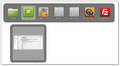
Cinnamon 1.6 showing an Alt-Tab thumbnails and window previews.
-
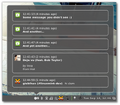
Cinnamon 1.6 showing a Notification Applet.
-
Cinnamon Control Center in Cinnamon 4.0.10
.png)


- ↑ Lefebvre, Clement (2 January 2012). "Introducing Cinnamon". The Linux Mint Blog. Archived from the original on 29 February 2012.
- ↑ 2.0 2.1 Lefebvre, Clement (23 January 2012). "Cinnamon 1.2 released". cinnamon.linuxmint.com. Archived from the original on 1 November 2012.
- ↑ "New features in Linux Mint 18 Cinnamon". Linux Mint. Archived from the original on 9 April 2017. Retrieved 17 April 2017.
- ↑ Stahie, Silviu (28 January 2016). "Linux Mint Is Getting Its Own Apps Starting with the 18.x Branch". Softpedia. Archived from the original on 27 April 2016. Retrieved 17 April 2017.
- ↑ Nestor, Marius (3 February 2016). "Linux Mint Devs Showcase the First Two X-Apps for Linux Mint 18 "Sarah"". Softpedia. Archived from the original on 28 April 2016. Retrieved 17 April 2017.
- ↑ "Cinnamon 1.4 (GNOME Shell Fork)". medvim.com. 13 March 2012. Archived from the original on 6 April 2016.
- ↑ "User guides for Linux Mint, Cinnamon edition, many languages and versions". linuxmint.com. Archived from the original on 14 June 2014. Retrieved 17 June 2014.
- ↑ Schürmann, Tim; Kißling, Kristian. "Cinnamon 1.4". Linux Magazine. Archived from the original on 11 January 2023. Retrieved 15 May 2022.
- ↑ Lefebvre, Clement (31 January 2012). "How to make a Cinnamon applet (Force Quit applet tutorial)". cinnamon.linuxmint.com. Archived from the original on 4 December 2012.
- ↑ Lefebvre, Clement (28 January 2012). "New sections for themes, applets and extensions: Cinnamon". cinnamon.linuxmint.com. Archived from the original on 31 May 2012.



